Saturday, August 29, 2009

Back to Basics


It feels like just yesterday I was programming card games in C++, but now I'm starting to learn Java so it's back to the basics -- the obligatory "Hello World" program.

NetBeans feels similar to C++ IDEs that I've used, so navigating the menus isn't hard, and once I learn to code a bit more, I'll try and make a few of my own programs and see what I can do.

Wednesday, August 26, 2009

Mmm, A Fresh Cup of Java™

I'm signed up for the AP Computer Science course at my school which focuses on Java programming, so I'm going to start learning it ahead of time. The more I can learn before the class starts, the faster I'll be able to the assignments, the more time I'll have to just chill out in class/work on my own side-projects.

I'll be following the tutorials from the Java website and using the NetBeans IDE for writing and compiling my code.

Wallpapers Part 1: Spectrum

Everyone loves to have a really great wallpaper (except you crazy terminal-based Linux users). It's the first thing you see when your computer boots up and it's the last thing you see when you shut down.

It has become a bit of a hobby of mine to collect great wallpapers from around the web. I'm currently using Photobucket as my image host so you can browse through my wallpapers and download them straight from there.

I'll update my wallpaper collection (and this blog) as I find new, cool wallpapers.

Without further ado, here are some spectrum-themed wallpapers to start things off:

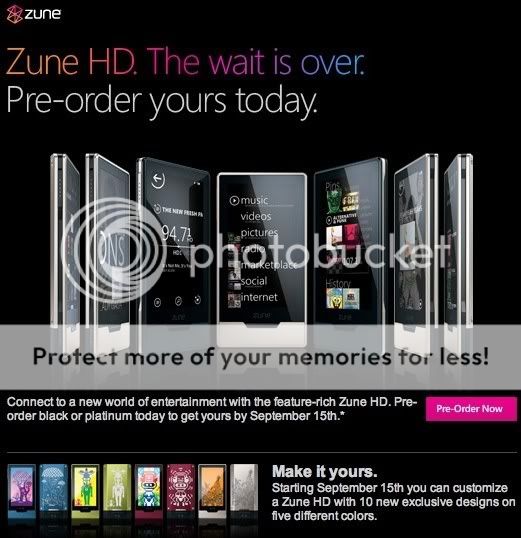
Zune HD


If you haven't heard, the Zune HD is Microsoft's next installment of the Zune PMP. I've been following the news of the Zune HD since the rumors began to surface back around April, and I must say this device looks like a promising contender in the PMP market.

A few of its main features are:
  • Multi-touch touchscreen
  • OLED Screen (better image, better battery life)
  • NVIDIA Tegra chipset (powerful chip with great battery life)
  • HD Radio
  • 720p output when used in conjuncture with a dock (sold separately)
  • Web browser (which might get full flash support sometime in the near future)
A list of full specs can be found here (PDF).

The Zune HD comes out September 15th and is available for pre-order from many online retailers such as Amazon and the Microsoft Store (although the pre-orders are only avaible in black for the 16gb model - $219.99 and platinum for the 32gb model - $239.99). If you order from Zune Originals after September 15th, more colors will be available.

I'm leaning towards getting one of these, although I think I'll reserve judgment until a week or two after release for some in-depth reviews. Also, I want to see what Apple has in store on September 9th at their iPod event. No doubt they'll have some announcements to try and steal some of the Zune HD's thunder. Hey, there might even be some announcements enticing enough to make me rethink the Zune, but only time will tell.

Saturday, May 16, 2009

Lab 10: Laser Tag

Well that was easy.

Lab 10 was an introduction to using structs--I had to write a program which simulates a game of laser tag between two people by using structs to store the player's names (ex: player1.name = "Tony"), their laser strength, and their shield strength. At the end the program displays the winner of that round of laser tag.

Structs are pretty simple to use and are useful (it makes organizing a lot of info much easier), and this lab only took me about 20-30 minutes.

The source code: http://www.mediafire.com/?xmzjlzjym02

Friday, May 15, 2009

Windows Live Movie Maker beta

I wanted to show my friend a video clip from a movie I have on my computer, and since I'm using Windows 7 RC1, it doesn't come with video editing software. Since I'm already trying out new things (Windows 7 being my case in point), I thought I would check to see if there were any advances in the Movie Maker department. What I found was Windows Live Movie Maker Beta, which is pretty dead simple as far as video editing goes.

You can: add text, stitch entire videos together, add music, add some simple transitions, and trim the ends of a video. That's about it, in a nutshell, although I'm hopeful that they'll be adding more features later on. For now, it's good enough for simple editing/combining videos. For saving videos, you can save your project to work on later, or you can output the video at 640x480 or 320x240 (both in .wmv format).

[Download Windows Live Movie Maker Beta] (click on the download link on the right, then you can choose to install just Movie Maker)

[Changes from previous Movie Maker versions - Windows Live Development Blog]

And now: some screen shots.


Wednesday, May 13, 2009

Windows 7: XP Mode

Grr.

I did a bit of deep digging on the matter and it turns out that my Gigabyte M61p-S3 motherboard supports AMD-V (hardware assisted virtualization), but that it's turned off by default and the only way I can turn it on again is to modify and re-flash my firmware, potentially ruining my motherboard forever. I'm gonna pass on this one.

Hopefully in a future BIOS version Gigabyte will give us the choice to turn it on or off. Until then, no XP Mode for me.